
 Proudly Printed in the USA by our 5-Star Team
Color Copies Online — Custom Color Printing, folding, punching, lamination, 20+ Paper Stocks & more
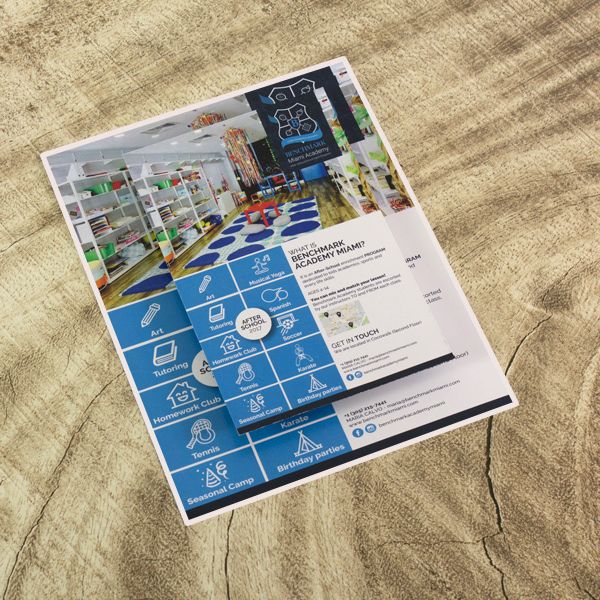
This is our most customizable color copy product. Order color printing online with your choice of over 20 paper stocks — including uncoated text, coated gloss and silk, heavy cardstock, textured linen, and colored paper for printing bold backgrounds without using extra ink. Add professional finishing like lamination, sequential numbering, scoring, and variable data printing (custom quote needed). Every option is priced transparently through our instant calculator, so you see your exact color printing cost per page before you order.
Whether you're printing 50 copies of a training manual or 10,000 double sided flyers for a marketing campaign, we produce your job in-house at our facility in Oakland Park, Florida. We handle everything from document printing and file review to finishing and shipping — and if you need something last-minute, we can work with you directly to meet your deadline. ¿Habla español? Hablamos español.
What Are Color Copies?
Color copies are full-color reproductions of a document or design, printed on a commercial digital laser press. Unlike a home or office inkjet printer, commercial laser presses use toner and heat to fuse color onto the paper. The result is sharper text, more vibrant images, and colors that won't smear or bleed when touched — even on uncoated paper.
For most small businesses, churches, schools, restaurants, and community organizations, color copies are the most practical and affordable way to produce professional-looking materials. You get consistent commercial-quality output — from the first page to the last — without the high minimum quantities that traditional offset presses require. A run of 50 board meeting handouts gets the same print quality as a run of 5,000 event flyers.
The term "color copies" and "color printing" are used interchangeably today. Originally, "copies" meant reproducing an existing document on a copier, while "printing" is a process that starts with a digital file. When you order color copies from ColorCopiesUSA, you get the best.
Why Small Businesses and Organizations Choose Our Printing Service
You talk to real people. When you call 1-877-421-0668, you reach our production team — not a call center. If your file needs adjustments, if you're unsure which paper to choose, or if you need to change your order after placing it, you're speaking with the same people who will print your job.
We support last-minute needs. Because we control our own production schedule, we can accommodate rush orders that larger online printing services can't. Need 500 event programs by Friday? Call us before ordering and we'll confirm whether we can meet your deadline.
Transparent printing prices — no surprises. Our pricing is based on economies of scale — the more you print, the lower the price per page. The calculator shows this in real time so you can find the sweet spot between quantity and budget. Whether you need 100 copies or 10,000, the color printing price is always visible before you commit.
1,300 five-star reviews. Our clients on Google, Trustpilot, Yelp, and the BBB consistently highlight our print quality, fast turnaround, and responsive customer service. We've been serving businesses nationwide from South Florida since 2004.
Share a quote instantly. After configuring your order, you can generate a shareable link that shows your exact setup and pricing. Send it by email to a colleague or client for approval before ordering — they can view the quote without accessing your account.
Example Pricing
Prices vary by paper, quantity, size, and finishing. Here are real examples showing different configurations. Click any card to see that exact setup in the calculator — then adjust to fit your project.
Prices shown are as of February 2026 for the specific configurations described. Your actual price depends on your selections. Use the calculator above for exact pricing including delivery estimates.
How Much Do Color Copies Cost?
The cost of color copies depends on four factors: paper stock, quantity, single or double sided printing, and finishing options. Here's a general sense of color copy prices so you can plan your budget:
- Standard text paper (20#–24# bond): Color printing cost per page starts around $0.08 for larger runs and scales down as quantity increases. A run of 1,000 copies on 24# bond prints for roughly 8–10 cents per page.
- Coated papers (80#–100# gloss or silk): Expect to pay a modest premium over uncoated text — typically a few cents more per page. The smoother surface delivers sharper images, making this popular for brochures, catalogs, and photo-heavy materials.
- Card stock and cover (80# cover, 100# cover, 14pt, 16pt): Heavier stocks cost more per page because the material itself is more expensive. Cardstock color printing is ideal for postcards, book covers, and display materials.
- Linen and specialty papers: Premium papers carry a higher price per page, but they communicate quality without needing heavy design work.
- Colored paper: Printing on colored paper is often more economical than printing a solid color background with ink — the paper provides the background color at a lower cost.
Double sided color printing costs less than printing two separate single-sided sheets because both sides share one sheet of paper. If your project works on both sides, choosing double sided printing is the most cost-effective approach.
The cheapest way to print color copies is to order in volume. Our printing prices drop significantly at higher quantities — what costs $0.42 per sheet at 250 copies might drop to $0.08 per page at 1000 copies or more. Whether you want to print color paper documents, flyers, or training manuals, use the calculator on this page to see your exact price for any configuration. No account required, no waiting for a quote.
Where Can I Print Color Copies?
Online printing services like ColorCopiesUSA are significantly cheaper than retail copy shops (FedEx Office, Staples, Office Depot) for any job over 100 copies — typically 60–80% less per page. You configure your order online, see your price instantly, and your job ships directly to you. In the South Florida area, local pickup is available at our Oakland Park facility.
Digital vs Offset Printing: Which Do You Need?
Digital and offset are the two main production technologies for color printing, and the right choice comes down to quantity. Understanding the difference helps you get the best price for your run size.
Digital Printing (What This Product Uses)
Digital laser presses print directly from your PDF file — no plates, no lengthy setup. This keeps costs low on shorter runs because there's no fixed setup charge to spread across your copies. At ColorCopiesUSA, most orders from 1 copy up to approximately 2,500 copies are produced digitally on our in-house equipment.
Advantages: Lower cost on short-to-medium runs. Faster turnaround (no plate-making step). Print exactly the quantity you need — no overruns. Easy to reorder with changes to your file. Variable data capability (personalize each copy with different names or codes).
Ideal for: Flyers, handouts, reports, menus, postcards, brochures, training manuals, event programs, and any project where you need a few dozen to a couple thousand copies.
Offset Printing (For High-Volume Runs)
Offset presses use custom-etched plates for each job. Making those plates takes time and money, but once the press is running, the per-copy cost drops steeply. If you need 3,000 or more identical copies of the same piece, offset printing usually becomes more economical than digital.
Advantages: Lowest per-unit cost at high volumes. Slightly wider color gamut on certain stocks. Can handle very large sheet sizes.
Ideal for: High-volume runs of brochures, catalogs, direct mail campaigns, and any project where you need thousands of identical copies and can plan ahead for longer production time.
How to Decide
For most small business and organization needs, digital is the right choice — and it's what you're configuring when you use the calculator on this page. If your project calls for 3,000+ copies and you have flexibility on timeline, call us at 1-877-421-0668 and we'll compare digital vs offset pricing for your specific job. In many cases, digital is competitive even at higher quantities depending on paper and finishing choices.
Choosing the Right Paper for Your Project
This product supports over 20 paper options for color printing on paper of every type. Not sure which to choose? Here's a practical guide. All options are available in standard 8.5 x 11 (letter), 8.5×14 (legal), and 11×17 (tabloid) sizes. For a deeper dive into paper weights and finishes, visit our Paper Weight & Grades guide.
Quick rule of thumb: Text-weight paper bends easily (flyers, booklet pages). Cover stock is rigid (postcards, binder dividers). Linen has a textured feel (invitations, letterhead). Colored paper printing replaces ink with paper color (economical for bold backgrounds).
 Some of the 20+ paper stocks we keep in production — from 24lb
linen writing to 80lb satin cover and 11×17 tabloid sheets.
Some of the 20+ paper stocks we keep in production — from 24lb
linen writing to 80lb satin cover and 11×17 tabloid sheets.
Uncoated Text Papers
Natural feel, easy to write on, no shine. Best when content matters more than visual impact.
| Paper | Also Known As | Feel | Best For | Example |
|---|---|---|---|---|
| 20# Bond | 50# text, copy paper, 75 gsm | Thinnest — standard copy paper | Flyers, forms, handouts, notepads, draft copies | A restaurant prints 500 daily special flyers for the counter |
| 24# Bond | 60# offset text, 90 gsm | Slightly thicker, less see-through | Letters, invoices, sell sheets, instruction manuals, tri-fold brochures, double-sided printing | A property manager prints tenant welcome packets with info on both sides |
| 28# Bond | 70# offset text, 105 gsm | Solid, professional weight | Training manuals, proposals, reports, multi-page booklets | A nonprofit prints a 20-page program for their annual fundraiser |
| 32# Bond | 80# uncoated text, 120 gsm | Premium — very little show-through | Executive reports, annual reports, important proposals | A consulting firm prints a bound client deliverable with charts |
→ Learn more: All About 20# Bond Paper · How Paper Cost Affects Your Project
Coated Text Papers
Smooth surface that makes colors vivid and photos sharp. Not ideal for writing. Gloss reflects light (like a magazine); silk has the same color quality without the shine.
| Paper | Finish | Feel | Best For | Example |
|---|---|---|---|---|
| 80# Gloss Text | Shiny, reflective | Mid-weight, smooth | Brochures, photo flyers, product catalogs, event programs | A real estate agent prints property flyers with full-color listing photos |
| 80# Silk Text | Smooth, semi-matte | Same weight, elegant feel | Upscale brochures, lookbooks, menus, design portfolios | A boutique prints a seasonal lookbook with fashion photography |
| 100# Gloss Text | Shiny, reflective | Heavier, substantial | Premium catalogs, magazine-style publications | A school district prints a glossy parent handbook with campus photos |
| 100# Silk Text | Smooth, semi-matte | Heavier, luxurious | High-end reports, corporate communications, formal programs | A law firm prints client-facing materials that need a premium feel |
→ Learn more: Matte vs Glossy Paper · Uncoated vs Gloss vs Matte vs UV · Paper Coatings Explained
Cover Stock
Rigid sheets that don't bend easily — for covers, postcards, dividers, and display pieces. Note: "80# cover" is much thicker than "80# text" because they are measured from different parent sheet sizes.
| Paper | Finish | Feel | Best For | Example |
|---|---|---|---|---|
| 80# Cover Gloss | Shiny | Light card stock | Book covers, dividers, postcards, table tents | A café prints table tent inserts for weekend brunch specials |
| 80# Cover Silk | Smooth semi-matte | Same weight, refined | Elegant covers, presentation handouts, folder inserts | A wedding planner prints weekend itinerary cards for guests |
| 100# Cover Gloss | Shiny | Heavier card stock — rigid | Postcards for mailing, booklet covers, signage inserts | A gym prints promo postcards to mail to nearby neighborhoods |
| 100# Cover Silk | Smooth semi-matte | Heavy, elegant | Premium covers, certificate backing, formal programs | A university prints graduation ceremony program covers |
| 14pt Board Semi-Gloss | Semi-gloss | Very thick — business card weight | Heavy-duty covers, point-of-purchase displays, counter cards | A retailer prints shelf talkers and counter display cards |
| 16pt Board Semi-Gloss | Semi-gloss | Extra thick — premium, rigid | Rigid signage, premium covers, promotional materials | A brewery prints tap handle display cards for their tasting room |
→ Learn more: Card Stock Paper Weight Guide · 80 lb vs 100 lb Paper
Linen & Specialty Papers
Textured paper with a subtle woven feel. Communicates quality and formality without heavy design work — ideal for weddings, legal documents, executive stationery, and formal events.
| Paper | Color Tone | Weight | Best For | Example |
|---|---|---|---|---|
| 24# Linen Text — Solar White | Bright white | Text (bendable) | Letterhead, formal correspondence, résumés | A law office prints official letterhead for client communications |
| 24# Linen Text — Natural White | Warm, off-white | Text (bendable) | Personal stationery, memorial programs, elegant notices | A family prints memorial service programs with a warm feel |
| 100# Linen Cover — Solar White | Bright white | Cover (rigid) | Formal invitations, certificate paper, premium covers | A church prints baptism or confirmation certificates |
| 100# Linen Cover — Natural White | Warm, off-white | Cover (rigid) | Wedding invitations, gala invitations, award certificates | A nonprofit prints annual awards gala invitations |
Colored Papers
The paper itself provides the background color — more economical than printing a solid color background with ink. Great for color-coding systems and high-visibility materials. Keep in mind: the paper color will affect how your printed colors appear.
| Type | Available Colors | Weights | Best For | Example |
|---|---|---|---|---|
| Pastel | Blue, Orchid, Green, Goldenrod, Pink | 20# and 24# | Color-coded forms, routing slips, department-specific docs, attention-getting handouts | A school prints hall passes on goldenrod so they're easy to spot |
| Bright | Solar Yellow, Re-Entry Red, Pulsar Pink, Galaxy Gold, Terra Green | 24# | Safety notices, sale tags, clearance signs, high-visibility flyers | A retail store prints CLEARANCE shelf tags on Solar Yellow |
→ Learn more: How Paper Costs Affect Your Printing Project
Need Waterproof or Tear-Resistant Paper?
Synthetic plastic paper is available through our other products: Plastic Restaurant Menus for waterproof menus and outdoor reference sheets, or Spiral Bound Booklets on Synthetic Paper for field guides and construction manuals. Learn more in our Synthetic Plastic Paper guide.
 Color copy paper and printing comparison showing uncoated, coated
gloss and 14pt board with UV coating
Color copy paper and printing comparison showing uncoated, coated
gloss and 14pt board with UV coating
Finishing Options Available
After your color copies are printed, we can apply any combination of these finishing options. These are configured directly in the calculator — select what you need and your price adjusts instantly:
- Folding — half fold, tri-fold, z-fold, gate fold, accordion fold
- Drilling — 2-hole or 3-hole punch for binder insertion
- Collating — pages assembled in order, ready to distribute
- Stapling — corner staple or side staple
- Scoring — crease line for clean folding on heavy stock
- Lamination — gloss or matte protective coating
- Sequential numbering — unique numbers on each copy (raffle tickets, forms, invoices)
- Variable data printing — personalize each copy with different names, codes, or text
- Perforating — tear-off sections for tickets, coupons, or reply cards
Not sure which finishing option you need? Call us at 1-877-421-0668 and we'll walk you through it.
Who Uses This Product
This color copy product serves professionals who need precise control over their print specifications. Whether you need colored copies of marketing materials, print color documents for a presentation, or produce 8.5 x 11 color printing for an event, here are common use cases:
- Training departments — Custom manuals with numbered pages, laminated covers, and tabbed dividers on cover stock. Variable data lets you print each trainee's name on their copy.
- Real estate offices — Property listing flyers on 80# gloss cover with full-bleed photos. Printed in batches of 100-500 per listing, updated as needed.
- Restaurants and bars — Seasonal menu inserts on coated gloss text, table tents on cover stock. Rush production available when menus change mid-week.
- Nonprofits and churches — Event programs on linen paper for formal occasions. Fundraiser materials printed at volume for the lowest cost per piece.
- Schools and universities — Student handbooks, course packets, and orientation materials. Color-coded on pastel paper by department or grade level.
- Small businesses — Sell sheets, price lists, and product catalogs on silk text for a professional look without the glare of gloss.
Frequently Asked Questions
This product offers over 20 paper stocks organized into four categories:
- Uncoated text-weight papers (20#, 24#, 28#, 32# bond) — natural feel, easy to write on. Great for forms, handouts, manuals, and anything that gets handled frequently.
- Coated text-weight papers (80# and 100# in gloss or silk) — smooth surface that makes colors vivid and photos crisp. Best for brochures, catalogs, and image-heavy materials.
- Cover stock (80# cover, 100# cover, 14pt board, 16pt board) — rigid card stock for postcards, book covers, dividers, and display materials.
- Linen papers (24# text and 100# cover, in solar white or natural white) — textured paper with a woven feel, ideal for formal invitations, letterhead, and certificates.
- Colored papers — pastel shades (20# and 24#) and bright/neon colors (24#). Economical way to add a bold background without using ink.
Not sure which paper is right for your project? See the paper comparison tables above, or explore these guides:
- Paper Weight, Finishing, Brightness & Grades
- 80 lb vs 100 lb Paper — What's the Difference?
- Matte vs Glossy Paper
- Uncoated vs Gloss vs Matte vs UV Coated
Need waterproof or tear-resistant copies? Synthetic plastic paper is available through our Plastic Restaurant Menus and Spiral Bound Booklets on Synthetic Paper products.
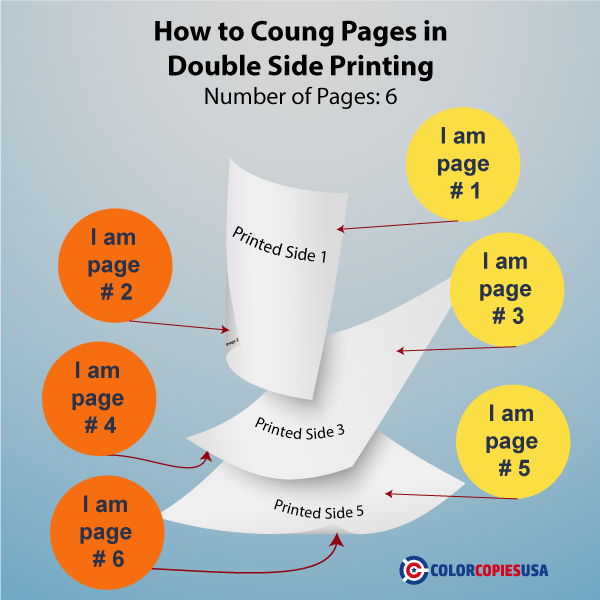
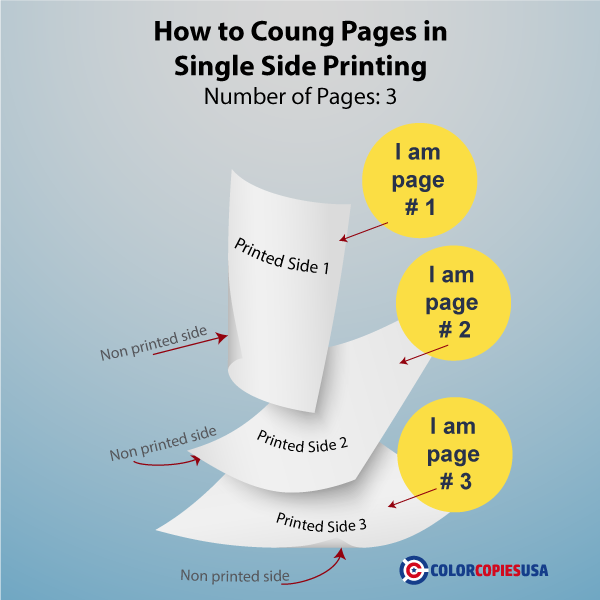
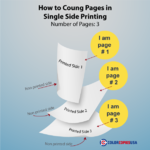
In printing, a "page" means one side of a sheet of paper. If you print on both sides of a sheet, that's 2 pages on 1 sheet.
- Single-sided (1-sided): Each sheet has printing on the front only. 10 pages = 10 sheets.
- Double-sided (2-sided): Each sheet has printing on both front and back. 10 pages = 5 sheets.
Our calculator includes a built-in verification tool: as you configure your order, it shows you exactly how many sheets of paper will be used and how many printed sides your job contains. Use this to confirm your order matches what you expect before checkout. If the numbers don't look right, adjust your page count or sides setting.
Our printing equipment — including the Revoria Press EC1100 by Fujifilm — produces vivid, professional-quality color output. Colors will be rich and sharp, especially on coated papers where the coating prevents ink absorption.
That said, there are some factors that affect how colors appear on your final prints:
- Paper type matters: Coated gloss and silk papers produce the most vibrant colors. Uncoated papers absorb more ink, so colors appear slightly softer. Colored paper will shift all printed colors (blue ink on goldenrod paper will lean toward green).
- Screen vs. print: Computer monitors and phone screens use RGB light to display color. Printers use CMYK toner or ink. Some colors — especially bright neons and certain blues — cannot be exactly reproduced in print. This is a universal printing limitation, not specific to our equipment.
- File preparation: For the most accurate color, submit files in CMYK color mode at 300 DPI resolution. RGB files will be converted automatically, but the conversion may shift some colors.
For the best results, we recommend using coated paper and submitting high-resolution PDF files in CMYK.
No — and this is true for all commercial printing, not just ours. Here's why:
Computer monitors, phone screens, and home/office printers all display color differently. Monitors use backlit RGB light, while commercial printers use CMYK toner or ink applied to paper. These are fundamentally different color systems, so an exact match between screen and print is not physically possible.
What we do guarantee is consistency within your order — all copies in your run will look the same. We keep our equipment professionally calibrated and maintained to produce stable, reliable output.
However, we want to be upfront: we do not provide color-matching guarantees. Colors may vary slightly between different print runs, and between digital and offset production methods. If your project requires precise color matching (such as matching a specific Pantone color or a previous print run), please contact us before ordering so we can discuss options.
Everything happens through the calculator on this page:
- Configure your order — select paper stock, quantity, single or double-sided, and any finishing options. Your price updates instantly as you change options.
- See your delivery estimate — enter your ZIP code and the calculator shows your estimated production time, shipping time, and in-hand date.
- Upload your files — attach your print-ready PDF or design file. You can also use our free online designer to create your artwork from scratch or from a template.
- Check out and pay — no account is required to get pricing, but creating a free account gives you access to order history, saved designs, and reorder tools.
Our pricing rewards volume — the more copies you order, the lower your per-copy cost. The calculator makes this transparent so you can find the right balance of quantity and budget for your project.
We cannot guarantee an exact color match between separate print runs. Here's why:
- Different production dates may mean different equipment calibration states, humidity levels, or toner batches.
- Your reorder may be printed on a digital press while the original was offset (or vice versa), depending on the most efficient method for the quantity ordered.
- Paper stocks from different manufacturing batches can have subtle variations in whiteness or coating thickness.
We keep our equipment professionally calibrated, and the results will be consistent and professional. But if you're placing two orders that will be displayed side-by-side (for example, a second batch of brochures to sit next to the first batch on a rack), we recommend ordering the full quantity in a single run.
PDF is strongly preferred. A well-prepared PDF preserves your fonts, layout, images, and colors exactly as you designed them. For best results:
- Use CMYK color mode (not RGB)
- Include images at 300 DPI resolution or higher
- Embed all fonts in the PDF
- Include 0.125" bleed if your design goes to the edge of the paper. Learn more about bleed setup in our Full Bleed Printing Guide
We also accept: JPEG, TIFF, PNG (at 300+ DPI for print quality), and Adobe InDesign/Illustrator native files.
Microsoft Word and PowerPoint: We can work with these, but be aware that Word documents often have layout issues. Word does not embed its formatting settings into the file, so fonts may shift, spacing may change, and elements may move when we open your file on our systems. If you submit a Word file, we'll do our best to match your intended layout — but PDF is always safer.
Canva users: Canva has improved significantly and can produce good print-ready files. When exporting from Canva, select "PDF Print" with crop marks and bleed enabled. Double-check that your text hasn't been cut off at the edges and that your images are at full resolution (not pixelated).
Yes — we can often produce copies from a physical original by scanning it on our production equipment. This is sometimes called "scanning from the glass."
A few things to keep in mind:
- This is not a walk-in service. We operate on a production schedule, so your job will be queued alongside other orders. Please don't expect to drop off your original and leave with finished copies the same visit.
- There will be a scanning surcharge. The amount depends on the original piece — its size, condition, whether it needs color correction, and how much preparation is required to get a clean scan.
- Quality depends on the original. A crisp, clean original produces better results than a faded or creased one. We'll do our best to optimize the scan, but the output can only be as good as what we start with.
If you have a hard copy you'd like reproduced, call us at 1-877-421-0668 before placing an order online. We'll discuss your original, give you a cost estimate for the scanning work, and advise on what to expect from the final result.
When you contact us, you reach our actual production team — not a separate call center. This means the person helping you understands printing and can give you specific, practical advice about your project.
- Phone: 1-877-421-0668 (Eastern time business hours)
- Email: Through the contact form on our website
- File review: We review every uploaded file before printing. If we spot an issue — wrong resolution, missing bleed, font problems — we'll contact you before we print.
Common things our team helps with: choosing the right paper for your project, confirming file setup and bleed, coordinating rush orders and delivery deadlines, providing guidance on finishing options, and troubleshooting design files. Hablamos español.
Both. You can pick up at our production facility in Oakland Park, Florida (near Fort Lauderdale) — just call ahead to confirm your order is ready. We also ship nationwide via FedEx, UPS, and USPS, with ground delivery typically taking 1–6 business days. Expedited options are available at checkout. The calculator shows estimated arrival dates based on your ZIP code, or call 1-877-421-0668 to confirm before ordering.
Bleed means colors or images extend to the very edge of the paper with no white border. We print on an oversized sheet and trim to final size. Your file needs an extra ⅛" of image beyond the trim line on all sides, plus crop marks so our equipment knows where